Fig. 01 — Signal dossier / 2026.10
PySR: Discover Mathematical Laws from Data with Symbolic Regression
PySR symbolic regression discovers mathematical laws from data, evolving readable equations instead of black-box weights. A Signals post on interpretable ML.
- Published
- 20 Oct 2026signal no. 01
- Category
- Interpretable MLfield note
- Read time
- 19 min~3981 words
- Topics
- PySR+ 3 more
- Author
- Trisham Patilindependent reading
Filed 2026-10-20 Signal no. 01Interpretable ML Read time: 19 min
What Is PySR?
PySR is an open-source library for symbolic regression. Most machine learning fits weights inside a fixed model. Symbolic regression instead searches for a mathematical expression, such as $y = 2.5\cos(x) + x^2$, that best satisfies an objective. What you get back is an equation a person can read, check and reuse, not a black box.
PySR has been built for three things: speed, flexibility and ease of use. You can choose the operators, the loss and the constraints on the search. You still drive it from a few lines of Python.
Under the hood, PySR is a front end to the Julia library SymbolicRegression.jl. The two are developed together, and the Julia side runs the actual equation search. The algorithms behind it are described in the PySR paper, Interpretable Machine Learning for Science with PySR and SymbolicRegression.jl (Cranmer, 2023).
Symbolic Regression Beyond Low-Dimensional Data
Symbolic regression works best when the data has only a handful of input variables. With many inputs, the space of possible equations grows too fast to search directly.
One way around this is symbolic distillation. First, train a neural network on the high-dimensional problem. Then run symbolic regression on the network’s internal pieces, so each learned function is replaced by an explicit equation. The paper Discovering Symbolic Models from Deep Learning with Inductive Biases (Cranmer et al., 2020) uses this on N-body physics problems.
That makes PySR both an equation-discovery tool and a way to interpret deep neural networks: it turns what a network has learned into a formula you can inspect.
1. Can PySR handle text values?
No. PySR cannot work with raw text. Symbolic regression builds explicit equations from operators like $+$, $\times$, $\sin$ and $\exp$, so every input feature and the target must be numeric (float or int).
How to handle it: encode or vectorize text and categorical columns before passing them to PySR. Standard tools such as OneHotEncoder, OrdinalEncoder or numeric text embeddings like TF-IDF turn them into numeric columns.
2. Do you need to normalize the data?
PySR will run on unscaled data, but scaling your features and target is strongly recommended, for two reasons:
- It prevents numerical overflow. The evolutionary search tries many combinations of operations, including powers and exponents. If one column lies between $0$ and $1$ and another is in the millions, candidate equations quickly hit
NaNorInf. The run can then fail or ignore those features. - It improves constant optimization. PySR tunes the constant coefficients inside each candidate formula. On scaled data, that inner optimizer converges faster and more reliably.
The quick fix: pass your features ($X$) and target ($y$) through a scikit-learn scaler such as StandardScaler or MinMaxScaler before calling .fit(X, y). The search stays stable and the equations come out cleaner.
PySR Installation
Install with pip or conda
PySR is available on both pip and conda-forge:
pip install pysr
conda install -c conda-forge pysr
You don’t need to install Julia yourself. The Julia dependencies are downloaded and set up automatically the first time you import pysr, so expect that first import to take a while.
Install the PySR AI Agent Skill
If you use coding agents, you can give them a PySR skill. It teaches the agent how to use PySR as one step inside a larger agentic loop:
npx skills add astroautomata/PySR
Add --global to install the skill for all your projects instead of just the current one.
Run PySR in Docker
To keep PySR and Julia isolated from your system, build it from the Dockerfile in the PySR repository.
First, clone the repo and move into it:
git clone https://github.com/astroautomata/PySR.git
cd PySR
Then build the image:
docker build -t pysr .
Start a container with an IPython session, ready to use PySR:
docker run -it --rm pysr ipython
For more options, see the PySR documentation.
How Does PySR Handle Overfitting?
Polynomial regression has a well-known failure mode. Raise the degree high enough and the curve passes through every training point, noise included, then swings wildly everywhere else.
Can PySR do the same? Yes. Left unconstrained, symbolic regression can also grow bloated, convoluted equations that memorize noise instead of describing the system.
PySR reduces this risk in three ways: its search returns a Pareto front, you can set hard complexity caps, and you can constrain operators and add regularization. To make this concrete, we ran both methods on the same noisy data.
The experiment. We sampled 40 training points from $y = 2.5\cos(x) + 0.5x^2$ on $-3 \le x \le 3$ and added Gaussian noise with $\sigma = 0.2$. That noise sets a floor: no model can score a mean squared error (MSE) much below $\sigma^2 = 0.04$ on fresh data. Another 500 points from the same process served as the validation set.
We fit polynomials of degree 1 to 20, and ran one PySR search using +, -, * and cos. The script is seeded and deterministic, so the numbers below are reproducible.
1. The Pareto Front: Accuracy vs. Complexity
Most machine learning models optimize a single number, such as MSE. PySR tracks two competing objectives at once:
- Accuracy: how well the equation fits the data.
- Complexity: how big the equation tree is, counted in nodes (operators, variables and constants).
So instead of handing you one final equation, PySR returns a Pareto front: the best equation it found at every complexity level (the best at complexity 5, the best at 6, the best at 7, and so on). PySR calls this list the hall of fame.
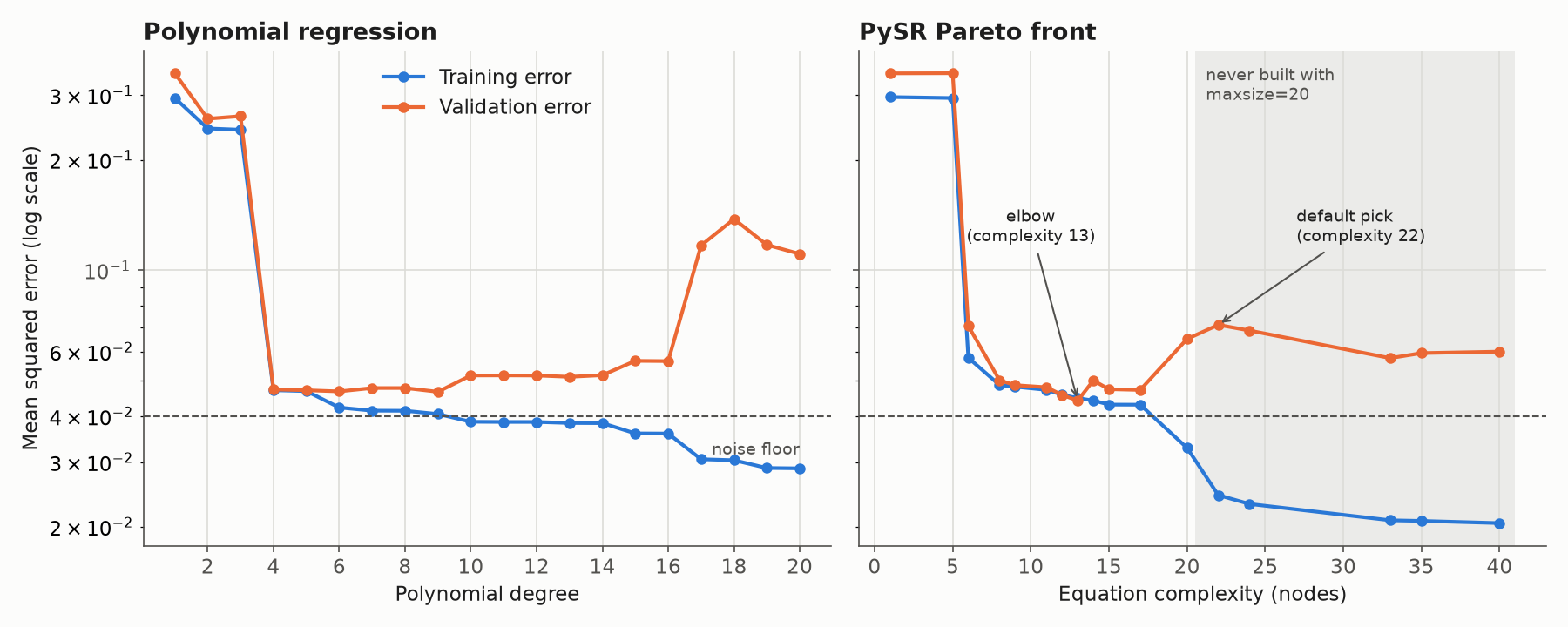
Training error (blue) always falls as models grow. Validation error (orange) tells you when growth turns into overfitting. Dashed line: the noise floor.
Both panels have the same shape, and that is the honest lesson:
- Polynomial regression reaches its best validation MSE, 0.047, at degree 4. After that, training error keeps falling (to 0.029 at degree 20) while validation error climbs to 0.138 at degree 18. The extra terms are fitting noise.
- PySR reaches its best validation MSE, 0.044, at complexity 13, almost exactly the 0.04 noise floor. Past complexity 17, training error drops to 0.020 but validation error rises to 0.071.
The Pareto front does not stop overfitting on its own. What it does is lay every trade-off out in one run, as readable equations, so you can see where extra complexity stops paying for itself. Polynomial regression needed 20 separate fits to draw the same curve, and each of those models is just a list of coefficients.
Here is what the models actually learned, including a stretch outside the training range:
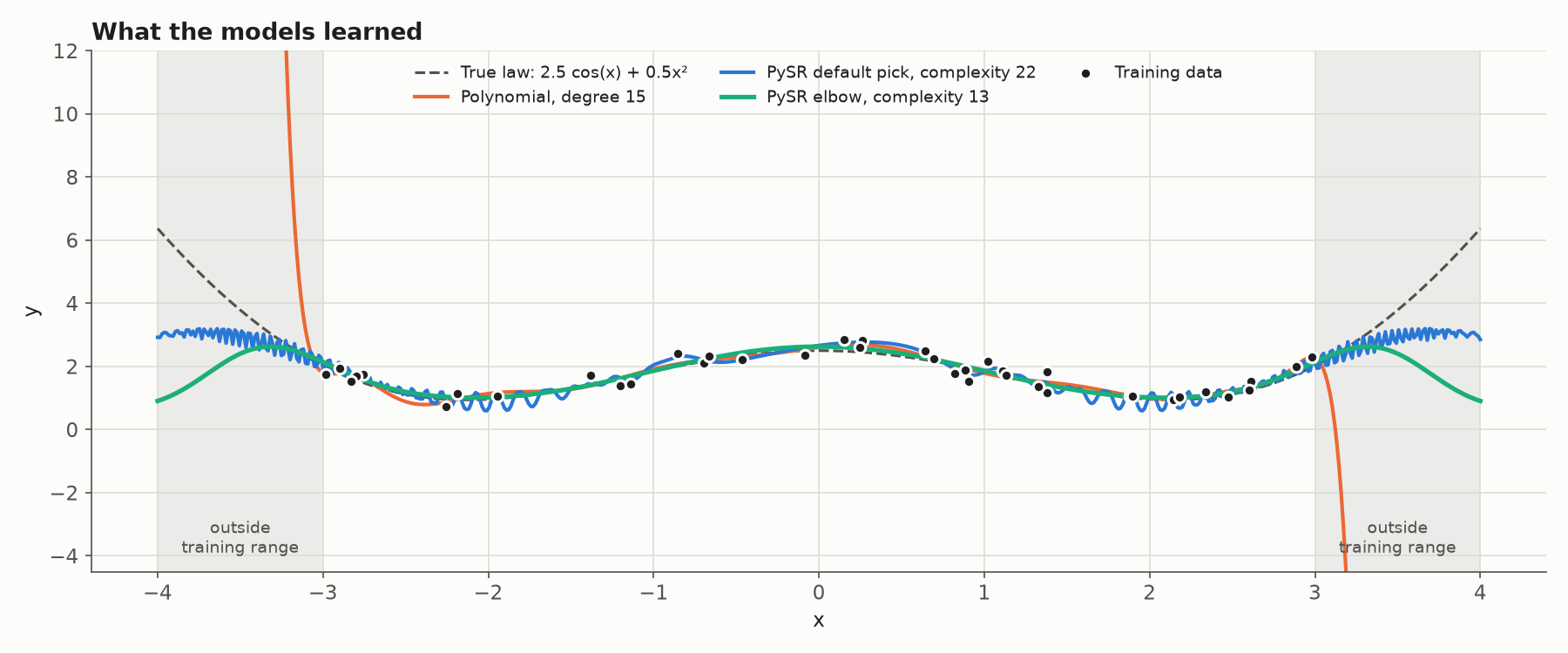
Grey bands: no training data. The degree-15 polynomial (orange) explodes as soon as it leaves the data. PySR’s complexity-22 equation (blue) ripples as it chases noise. The elbow equation (green) stays smooth.
- The degree-15 polynomial fits the training points well, then shoots off toward $\pm\infty$ just past $x = \pm 3$.
- PySR’s complexity-22 equation contains a $\cos(4.22\,x^3)$ term. That term exists only to bend the curve through individual noisy points, which is why the blue line ripples.
- PySR’s complexity-13 equation, $\cos\big(x\,(\cos(0.175\,x^2) + 0.349)\big) + 1.63$, tracks the true law across the whole data range.
One more honest detail: this run did not recover the exact law $2.5\cos(x) + 0.5x^2$. Its closest match was at complexity 12: $0.084\,x^2 + \cos(1.44\,x) + 1.64$. That has the right ingredients, a cosine plus a quadratic, with different constants. With 40 noisy points, several simple formulas fit about equally well, which is also why the elbow equation drifts from the truth outside the training range.
The front is what lets you apply Occam’s razor: pick the simplest equation near the elbow of the curve, before validation error starts creeping up.
Occam's razor is a principle usually credited to the 14th-century philosopher William of Ockham: when two explanations fit the evidence equally well, prefer the simpler one.
In machine learning, "simpler" means fewer assumptions and fewer moving parts. A simpler model has less freedom to memorize noise, so it is more likely to keep working on data it has never seen.
In PySR, the razor is literal. Complexity is a number on the x-axis. In our run, the complexity-8 equation scored a validation MSE of 0.050 and the complexity-13 equation scored 0.044, and both sit close to the 0.04 noise floor. If you would rather read and trust a shorter formula, the 8-node equation, $0.838\,(\cos(1.60\,x) + 2.22)$, is a perfectly defensible choice.
Occam's razor is a tie-breaker, not a law of nature. It does not say "the simplest model wins". It says "among fits that are equally good, the simplest wins".
2. Hard Complexity Caps with maxsize
You can put a ceiling on how large an equation tree may grow. In PySR this parameter is called maxsize, it counts nodes, and its default is 30. A separate maxdepth limits how deeply operators can nest.
from pysr import PySRRegressor

model = PySRRegressor(
    maxsize=20,   # no equation may have more than 20 nodes
    maxdepth=8,   # optional: limit nesting depth too
)
A cap stops the genetic algorithm from building runaway expressions with dozens of nested terms. In the first figure, the grey region on the right is everything a maxsize=20 run could never build, and it holds the equations whose validation error had started to climb.
Set the cap with your problem in mind. If the true law needs 25 nodes, a cap of 20 hides it from you. A cap is a guard rail, not a substitute for checking validation error.
3. Operator Constraints and Regularization
The third lever controls what the search is allowed to build.
Choose the operator set deliberately. Every operator you add widens the search space and gives the algorithm more ways to fit noise. We reran the experiment with a much wider set, adding /, ^ and exp to +, -, * and cos:
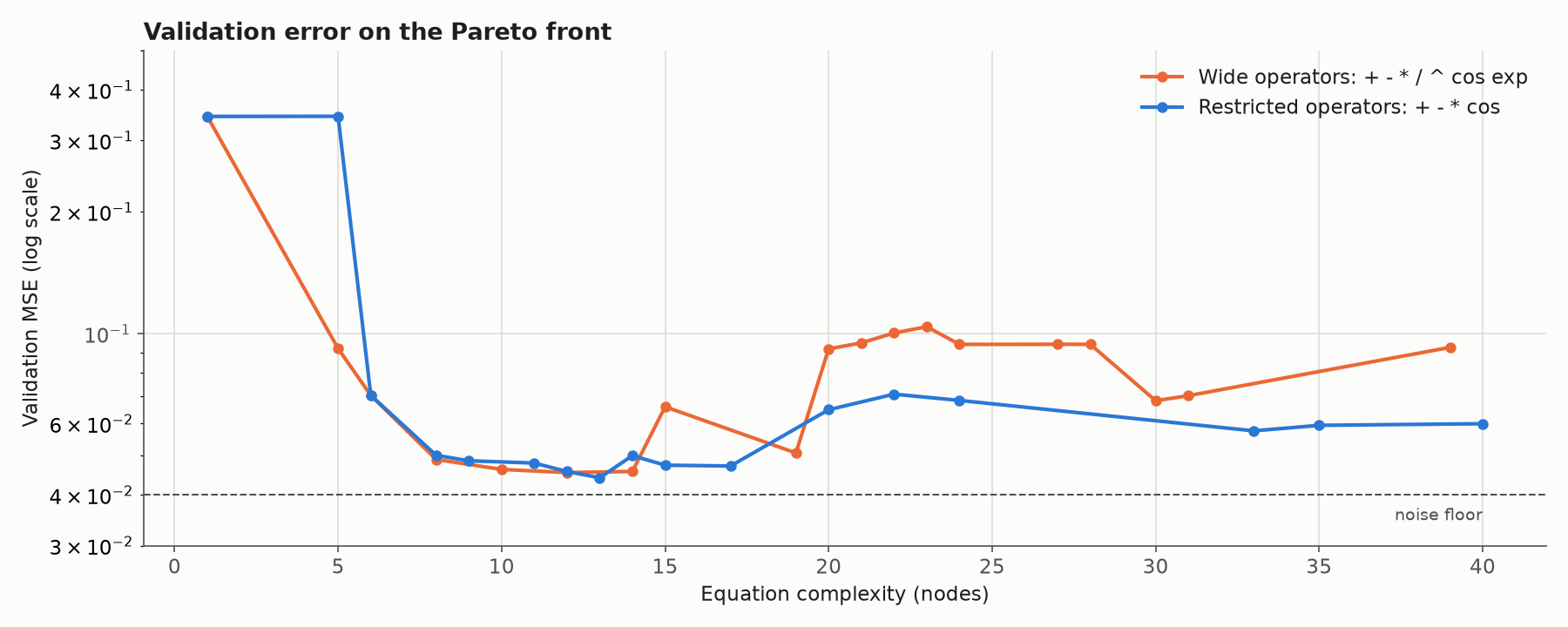
Same data, same search budget. The wider operator set (orange) overfits harder at high complexity.
At low complexity the two runs are almost identical. Between complexity 20 and 28, the wide set sits at a validation MSE of about 0.09 to 0.10, against 0.06 to 0.07 for the restricted set. The extra operators gave the search more ways to bend through noisy points.
Constrain how operators combine. If you know your system should not contain certain structures, tell PySR:
model = PySRRegressor(
    binary_operators=["+", "-", "*", "/", "^"],
    unary_operators=["cos", "exp"],
    # Exponents may only be a constant or a variable, never a sub-expression.
    constraints={"^": (-1, 1)},
    # Never nest cos inside cos, or exp inside exp.
    nested_constraints={"cos": {"cos": 0}, "exp": {"exp": 0}},
    # Make an expensive operator count for more complexity.
    complexity_of_operators={"exp": 3},
)
Regularize complexity directly. The parsimony parameter adds a penalty for each unit of complexity to the loss (its default is 0.0). For anything more specific, such as penalizing large coefficients, write your own objective with elementwise_loss or a full Julia loss_function.
Best Practice: Choose the Elbow, Not the Lowest Training Loss
To make sure a PySR model holds up on unseen data:
- Evaluate the whole hall of fame. Never blindly take the equation with the lowest training loss. Score every equation on held-out data, and plot validation error against complexity.
- Choose the elbow. Pick the equation where validation error reaches its minimum or flattens out, not the most complex one that shaves a little off training loss.
The hall of fame lives in model.equations_, and predict takes an index to use any row of it:
import numpy as np

model.fit(X_train, y_train)

val_mse = [
    np.mean((model.predict(X_val, index=i) - y_val) ** 2)
    for i in range(len(model.equations_))
]
elbow = int(np.argmin(val_mse))
print(model.sympy(index=elbow))
Why not trust the default pick? PySR’s default, model_selection="best", only sees training loss. Among equations within 1.5× of the lowest loss, it picks the one with the steepest loss improvement per unit of complexity. That is a sensible heuristic, but it cannot see your validation set.
In our experiment it picked the complexity-22 equation, the one with the noise-chasing $\cos(4.22\,x^3)$ term. Its validation MSE was 0.071, about 60% worse than the elbow’s 0.044.
Walkthrough of a Real-Life Physics Problem: Datacenter Power, Energy and Carbon
Toy functions are useful, but the real test is messy, real-world telemetry. In this section we point PySR at a green AI datacenter dataset and ask it to discover, from 100 rows, how a server’s electricity turns into carbon emissions.
The dataset is the North America subset of a green-AI datacenter telemetry table: 28,801 rows and 38 columns. Each row is one server reading: server and cooling type, inlet and exhaust temperatures, airflow, power draw, PUE, grid carbon intensity, renewable share and carbon emitted.
We follow the patterns in the PySR examples, especially Physics and Units. Every number below comes from an actual run with PySR 2.7.2.
Step 1: Write Down the Physics You Expect
Before running any search, sketch the chain from power to carbon. Each link is a standard energy-accounting step:
- Power to energy. A server drawing power $P$ (kW) for a time $\Delta t$ (hours) uses IT energy $E_{IT} = P \cdot \Delta t$ (kWh).
- IT energy to facility energy. Cooling, power conversion and lighting add overhead. PUE (power usage effectiveness) is the ratio of total facility energy to IT energy, so the facility draws $\text{PUE} \cdot E_{IT}$.
- Remove the clean share. If a fraction $r$ comes from renewables, only $(1 - r)$ of that energy comes from the carbon-emitting grid.
- Energy to carbon. Grid carbon intensity $CI$ (grams of CO₂ per kWh) converts grid energy into mass of CO₂.
Chain them together and divide by 1,000 to turn grams into kilograms:
\[m_{CO_2} = \frac{E_{IT} \cdot \text{PUE} \cdot CI \cdot (1 - r)}{1000}\]This is our hypothesis, not something we give to PySR. The question is whether PySR finds it on its own, from 100 rows, with decoy columns mixed in.
Step 2: Load the Data and Choose the Columns
We give PySR the four physical drivers plus two decoys that a careless model might latch onto: ambient air temperature and CPU utilization.
import numpy as np
import pandas as pd
from pysr import PySRRegressor

COLUMNS = {
    "power_consumption_kw": "E_it",        # IT power draw, kW (becomes energy below)
    "pue": "PUE",                          # facility energy / IT energy, dimensionless
    "carbon_intensity_gco2_kwh": "CI",     # grid carbon intensity, gCO2 per kWh
    "renewable_energy_ratio": "r",         # share of energy from renewables, 0 to 1
    "ambient_temperature_c": "T_amb",      # decoy: outside air temperature
    "cpu_utilization": "u_cpu",            # decoy: CPU load, percent
}
df = pd.read_csv("green_ai_datacenter_region_NA.csv")
data = df[list(COLUMNS)].rename(columns=COLUMNS)
target = df["carbon_emission_kg"]
We call the variable E_it rather than E, because PySR exports equations to SymPy, where E already means Euler’s number. PySR raises an error if a variable name clashes with a SymPy symbol.
Step 3: Turn Power into Energy
The rows are hourly readings, so energy in kWh equals power in kW times one hour. This is the first place physics shapes the code. A rate (kW) and an amount (kWh) are different quantities, and the target, a mass of CO₂, comes from an amount.
HOURS = 1.0
data["E_it"] = data["E_it"] * HOURS   # kW x 1 h = kWh
The numbers don’t change, but the units do, and in Step 7 the units are what make the search work.
Step 4: Train on 100 Rows, Hold Out the Rest
Symbolic regression needs surprisingly little data when a real law is present. We train on 100 random rows and keep the other 28,701 as a held-out test set.
train = data.sample(100, random_state=0)
X_train, y_train = train, target.loc[train.index]
X_test, y_test = data.drop(train.index), target.drop(train.index)
Step 5: Pick a Loss Function That Matches the Physics
Emissions in the sample range from about 5 kg to 79 kg. With plain squared error, the largest rows would dominate the fit. What we care about is relative error: being 1 kg off on a 5 kg reading is far worse than 1 kg off on 79 kg.
We use the loss from PySR’s physics example, written in Julia: the absolute difference of logs, plus a penalty when the sign is wrong.
LOG_RATIO_LOSS = """function loss_fnc(prediction, target)
    scatter_loss = abs(log((abs(prediction) + 1f-20) / (abs(target) + 1f-20)))
    sign_loss = 10 * (sign(prediction) - sign(target))^2
    return scatter_loss + sign_loss
end
"""
Both halves matter. On our first attempt we dropped the sign term, and PySR happily returned negated equations: a log of absolute values cannot tell $+20$ kg from $-20$ kg. Because the scatter term is an absolute (L1-style) error, a few bad rows pull on the fit far less than they would under squared error. That robustness pays off in Step 9.
The model itself uses only arithmetic operators, since energy accounting needs nothing more. The Objectives page covers more advanced custom losses.
def make_model(**kw):
    return PySRRegressor(
        binary_operators=["+", "-", "*", "/"],
        elementwise_loss=LOG_RATIO_LOSS,
        maxsize=20,
        niterations=300,
        populations=50,
        random_state=0,
        deterministic=True,      # reproducible results...
        parallelism="serial",    # ...which requires a single thread
        **kw,
    )
Step 6: Search Without Units, and Watch It Miss a Variable
First, a plain search, with no physics information at all:
plain = make_model()
plain.fit(X_train, y_train)
The hall of fame looks reasonable at first glance. Its best equation on held-out data is:
\[m_{CO_2} \approx E_{IT} \cdot \text{PUE} \cdot (0.343 - 0.335\,r)\]That is close to the real structure: energy, times PUE, times something like $(1 - r)$. But carbon intensity is missing. In our 100-row sample, $CI$ only ranges from 308 to 404 g/kWh, so PySR absorbed it into the constant $0.343 \approx 343/1000$.
On the held-out rows, this equation has a median error of 4.0%, and only 13.6% of rows land within 1%. The error is not random, either:
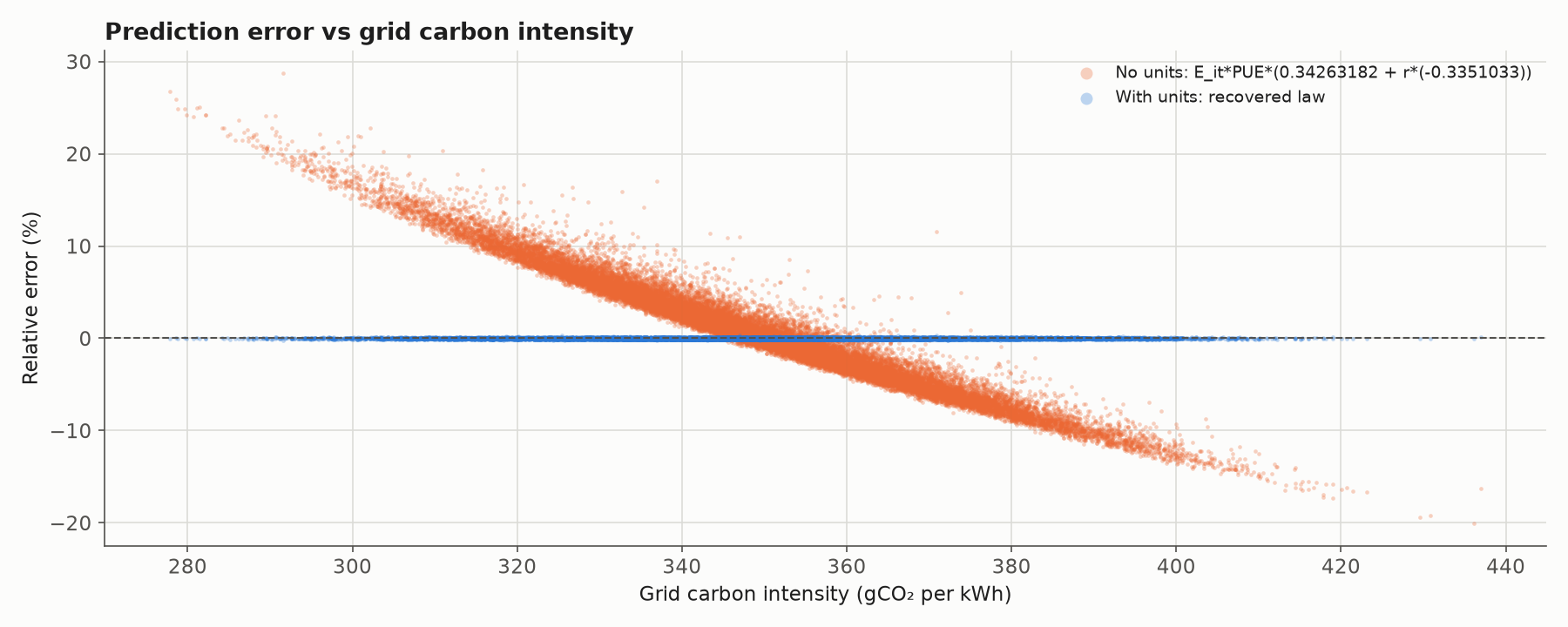
Orange: the no-units equation is 25% too high on clean grids and 20% too low on dirty ones. Blue: the units-constrained equation from Step 7 is flat at zero error.
A clean diagonal stripe in a residual plot is the signature of a missing variable. Two more warning signs appear in the no-units run:
- At complexity 17 and 19 it starts using the decoy
T_ambto shave off a little training loss. - Its default pick,
model_selection="best", is $0.091\,E_{IT}/r$. That says emissions rise as the renewable share falls toward zero, without limit, which is physically absurd. It scores a 5.7% median error.
Step 7: Add Physical Units, and Let Dimensions Do the Work
Now we tell PySR what each column is, using DynamicQuantities.jl unit strings:
X_units = ["kW*hr", "", "g/(kW*hr)", "", "K", ""]   # E_it, PUE, CI, r, T_amb, u_cpu
y_units = "kg"

units = make_model(
    dimensional_constraint_penalty=10**5,
    dimensionless_constants_only=True,
)
units.fit(X_train, y_train, X_units=X_units, y_units=y_units)
Three settings work together here:
X_unitsandy_unitsattach a physical dimension to every input and to the target. PUE, $r$ and CPU percentage are ratios, so they get""(dimensionless). Temperature gets"K". Units only track dimensions here, so a Celsius reading still carries the dimension of temperature.dimensional_constraint_penalty=10**5adds a large loss to any equation whose units don’t work out to kilograms.dimensionless_constants_only=Trueis the setting that makes the difference. By default, PySR lets constants carry any units it likes, so a constant can quietly patch up a broken equation.
That last point is not theoretical. On an earlier attempt we left the default (free-unit constants), still passing power in kW. PySR returned $P / (11.0\,r)$: the constant simply took on whatever units made kW come out as kg. It passed the dimensional check and was still wrong.
With only dimensionless constants, the units leave PySR a single route to a mass. Energy (kWh) times carbon intensity (g/kWh) gives grams, and nothing else does. Carbon intensity has to appear in the equation. The decoy temperature can never be added to a mass, so it never appears in the hall of fame.
You can see the dimensional penalty directly on the Pareto front:
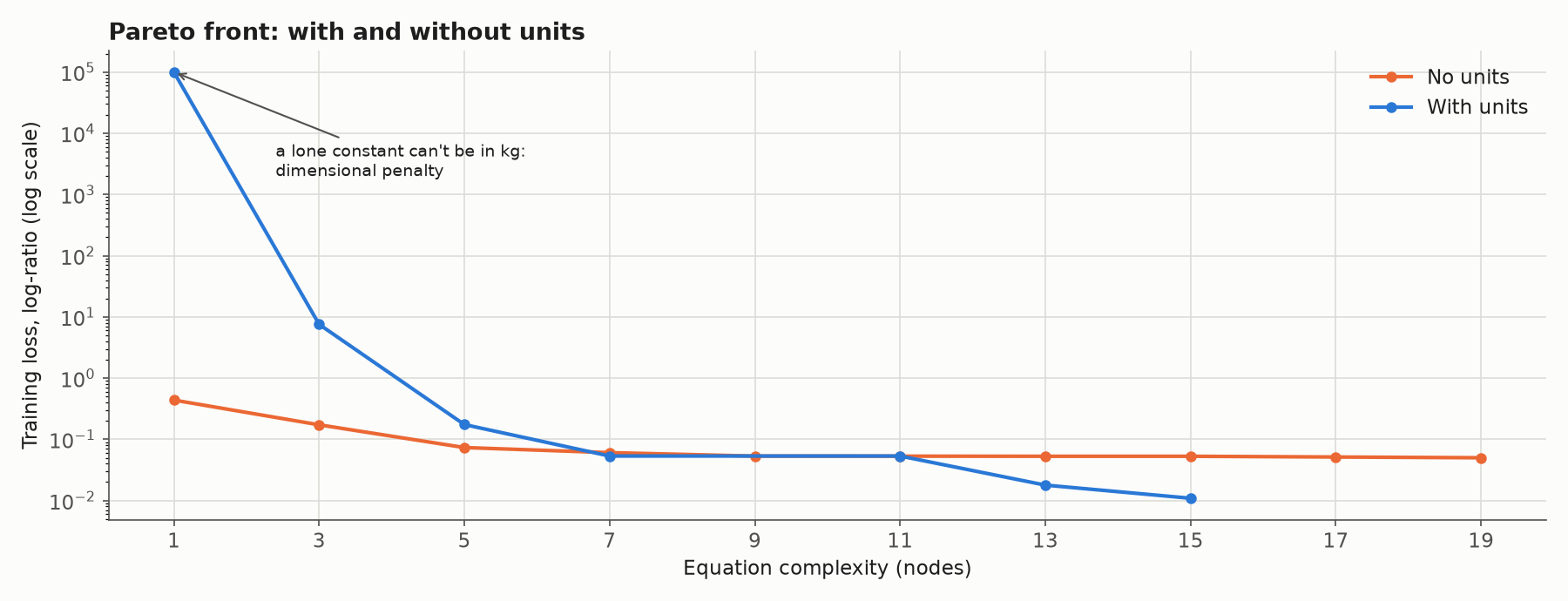
At complexity 1, a lone constant can’t be in kilograms, so it pays the 100,000 penalty. Without units (orange), loss stalls at about 0.05. With units (blue), it keeps dropping once all four physical drivers are in the equation.
Step 8: Read the Equation and Test It on 28,701 Rows
Here are highlights from the units-constrained hall of fame, with each equation scored on the held-out rows:
| Complexity | Equation found by PySR | Held-out median error | Rows within 1% |
|---|---|---|---|
| 3 | $CI \cdot E_{IT}$ | ~1,850× too large (grams, not kg) | 0% |
| 5 | $CI \cdot E_{IT} / 1808.8$ | 13.7% | 4.1% |
| 7 | $0.000261\,CI \cdot E_{IT} / r$ | 3.3% | 27.7% |
| 13 | $0.00236\,E_{IT} \cdot \text{PUE} \cdot CI \cdot (0.434 - 0.444\,r)$ | 0.63% | 71.3% |
| 15 | $E_{IT} \cdot \text{PUE} \cdot CI \cdot (0.2851 - 0.2851\,r) \cdot 0.0777 \cdot 0.0452$ | 0.05% | 98.5% |
The complexity-15 equation is also PySR’s default pick. It looks clumsy because it has three separate constants, but multiply them out and it simplifies to:
\[m_{CO_2} = 0.0009998 \cdot E_{IT} \cdot \text{PUE} \cdot CI \cdot (1 - 0.99993\,r)\]That is the law from Step 1, recovered from 100 rows:
- $0.0009998 \approx 1/1000$: the grams-to-kilograms conversion, found to within 0.02%.
- $(1 - 0.99993\,r)$: renewables remove their exact share of emissions.
- $E_{IT} \cdot \text{PUE} \cdot CI$: IT energy, scaled up to facility energy, converted to carbon.
- No decoys: ambient temperature and CPU utilization are gone.
On the 28,701 rows it never saw, the median error is 0.05%. 98.5% of rows are predicted within 1%, exactly as many as the hand-written law achieves.
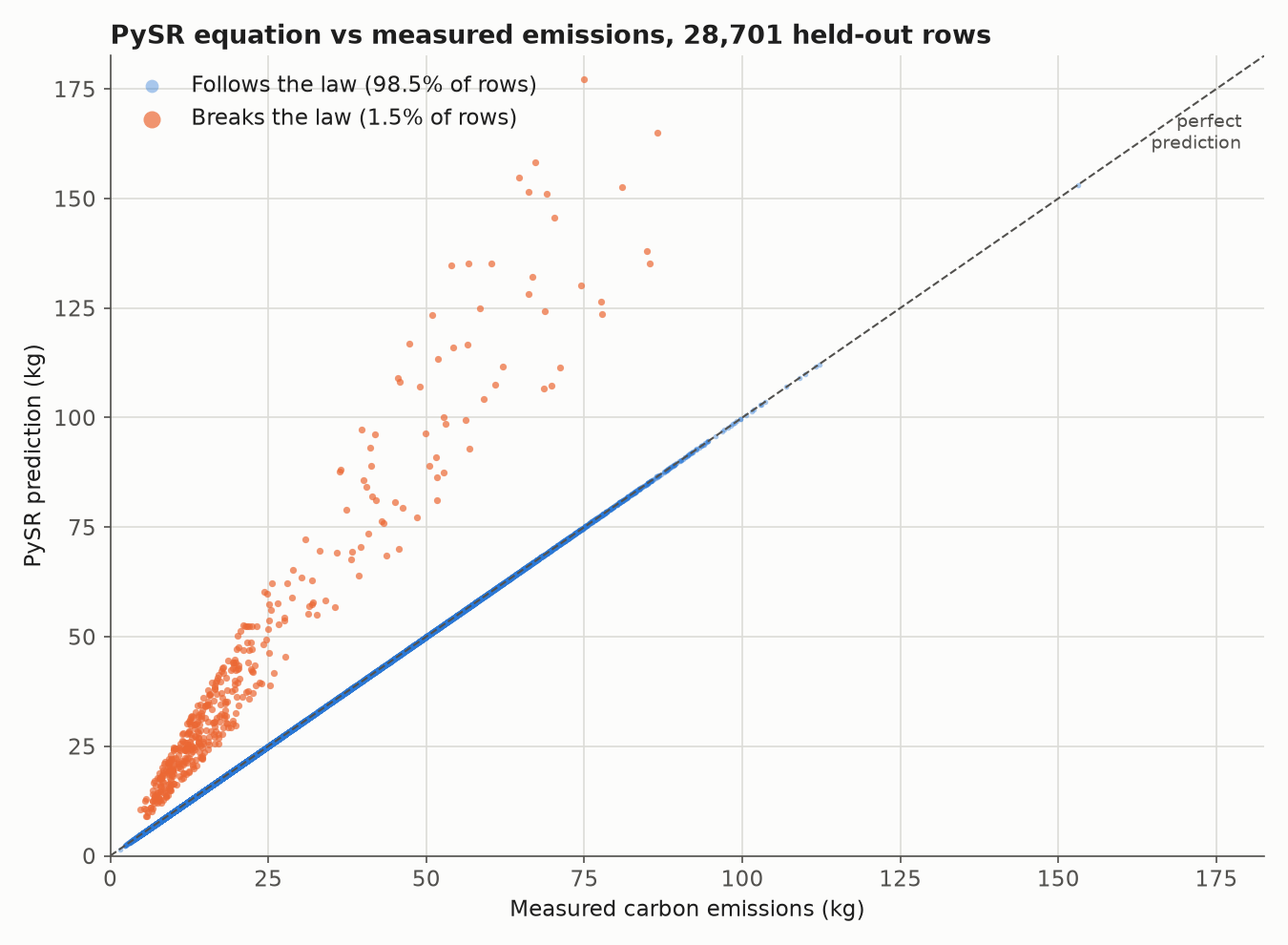
Blue: rows that follow the law sit exactly on the diagonal. Orange: about 1.5% of rows (435) sit well above it.
Step 9: Let the Equation Audit the Data
Those orange points are worth a closer look. A fitted formula is now a tool for checking the data itself:
- In all 435 law-breaking held-out rows, the recorded emissions are about half (median 0.51×) what the physics predicts.
- Those rows report an average IT load of 220 kWh, about twice the 112 kWh of normal rows.
Either the power readings in those rows are inflated, or the emissions are under-reported. The data alone can’t tell us which, but now we know exactly which rows to question. Only 2 of our 100 training rows were in this group, and the robust L1-style loss from Step 5 kept them from bending the fit.
This is something a black-box model can’t give you. A neural network would have quietly averaged those rows into its weights. An explicit equation turns them into a list of anomalies.
We also tried the thermal side of the dataset. Physics says that for an air-cooled server, the heat removed is $P = \dot{m}\,c_p\,\Delta T$: for a fixed power, more airflow means a smaller temperature rise between inlet and exhaust.
This dataset does the opposite. Across air-cooled rows, the exhaust-minus-inlet temperature rise increases with airflow (correlation +0.70), and a heat-balance fit of $\Delta T$ against $P / \text{airflow}$ explains only 25% of the variance ($R^2 = 0.25$).
That pattern suggests the thermal columns were generated statistically rather than measured, so there is no physical law there to find. Symbolic regression is powerful, but it is still a search through the data. If the law isn't in the data, the best PySR can do is fit noise, and units can only rule equations out, never create a law that isn't there.
Takeaways from the Walkthrough
- Write down the physics first. A five-line derivation told us what a correct answer should look like before we ran anything.
- Units are the most powerful constraint PySR has. With
X_units,y_unitsanddimensionless_constants_only=True, the search went from 13.6% of rows within 1% to 98.5%. - Free-unit constants can hide mistakes. Without
dimensionless_constants_only, a constant can absorb any unit mismatch. - Match the loss to the physics. Relative, L1-style error suits quantities that span orders of magnitude and data with a few bad rows.
- Residual plots reveal missing variables. A clean stripe against one input means that input belongs in the equation.
- An explicit equation doubles as a data audit. It found the 1.5% of rows that break the law.