Model Formats vs Inference Engines: Safetensors, GGUF, ONNX, vLLM, and llama.cpp Explained
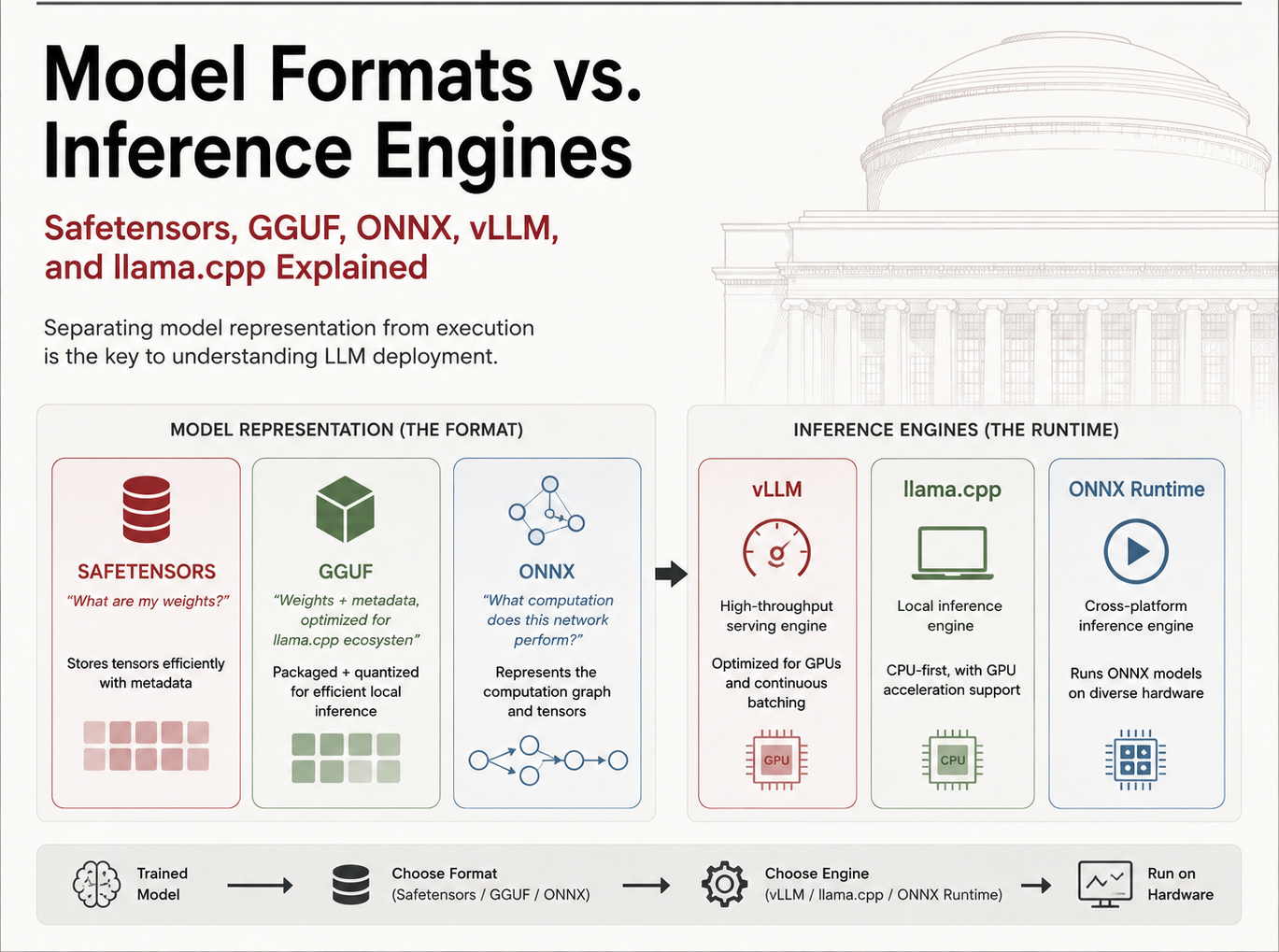
Model formats (Safetensors, GGUF, ONNX) describe how weights and computation are represented; inference engines (vLLM, llama.cpp, ONNX Runtime) decide how that representation is executed on hardware.
When you download a model from Hugging Face, it is easy to assume everything is the same kind of file — that a .gguf, a folder of .safetensors shards, and an ONNX export are three interchangeable ways of shipping “a model.” They are not. And the single most useful habit you can build when reasoning about LLM deployment is to separate model representation from inference engine.
That one distinction untangles almost every confusion around model formats and inference engines: why you can’t just hand a GGUF file to vLLM, why five .safetensors files are still one model, why ONNX feels different from Safetensors, and why vLLM and llama.cpp are not “formats” at all.
This post builds that mental model from the ground up.
I. Separating Representation from Execution
Suppose you have a trained Transformer. At its core, the model is basically:
Architecture
+
Weights
+
Configuration
+
Tokenizer
The weights are conceptually just large tensors:
Wq = [ ... billions of numbers ... ]
Wk = [ ... ]
Wv = [ ... ]
Wffn = [ ... ]
...
A model format is essentially a way of storing those tensors and the metadata needed to reconstruct and use the model. An inference engine is the software that actually loads a compatible representation and runs the Transformer on hardware.
These are two different layers, and most confusion comes from collapsing them into one:
flowchart TB
    T["Trained model"] --> R["Model representation<br/>(the format)"]
    R --> E["Inference engine<br/>(the runtime)"]
    E --> H["Hardware<br/>CPU / GPU"]
Crucially, changing the format does not change the neural network mathematically. It changes how the model is represented and consumed. The same conceptual model can live in multiple formats, each paired with a different runtime:
flowchart TB
    M["Llama 8B"] --> S["Safetensors"]
    M --> G["GGUF"]
    M --> O["ONNX"]
    S --> P["PyTorch / vLLM"]
    G --> L["llama.cpp"]
    O --> ORT["ONNX Runtime"]
    P --> C1["CUDA / GPU"]
    L --> C2["CPU / GPU"]
    ORT --> C3["GPU / CPU / accelerators"]
The architecture is conceptually the same across all three branches. The runtime and kernels that consume it can be very different.
II. Model Formats: Safetensors, GGUF, and ONNX
There are three formats you will keep running into, and they do not sit at the same level of abstraction.
Safetensors — “What are my weights?”
On Hugging Face today, you very commonly see files like:
model-00001-of-00004.safetensors
model-00002-of-00004.safetensors
...
Safetensors is primarily a safe, efficient tensor serialization format. It stores tensors such as Wq, Wk, Wv, along with metadata describing each tensor’s name, shape, dtype, and offset. PyTorch can then load them:
state_dict = load(...)          # read tensors from safetensors
model.load_state_dict(state_dict)
The important point: Safetensors is not the inference engine. It is the storage representation of the weights.
GGUF — “Weights + metadata, packaged for the llama.cpp ecosystem”
GGUF is another model-file format, most commonly associated with llama.cpp. A GGUF file packages the model’s tensors plus metadata into a single format designed for efficient loading and inference:
model.gguf
│
├── metadata
├── tokenizer information
├── model configuration
├── weights
└── quantized tensors
GGUF is especially popular for quantized local inference. A large model gets shrunk to fit in far less memory:
flowchart LR
    A["Llama<br/>FP16 weights"] --> B["quantize"]
    B --> C["Q4_K_M"]
    C --> D["model.gguf"]
So if you download llama-3-8b.Q4_K_M.gguf, you’re looking at a quantized GGUF model intended for a GGUF-compatible runtime such as llama.cpp.
ONNX — “What computation does this network perform?”
ONNX (Open Neural Network Exchange) is a fundamentally different idea from “another weight file.” Instead of saying “these are PyTorch tensors,” ONNX describes the computation graph:
flowchart TB
    I["Input"] --> MM["MatMul"]
    MM --> Add["Add"]
    Add --> SM["Softmax"]
    SM --> Out["Output"]
ONNX is designed as an interchange representation for neural-network computation. You export from a framework and then run on any backend that supports the graph’s operators:
flowchart TB
    PT["PyTorch"] --> ONNX["ONNX"]
    ONNX --> R1["ONNX Runtime"]
    ONNX --> R2["TensorRT"]
    ONNX --> R3["Hardware-specific runtimes"]
Here is the distinction in one table:
| Format | What it primarily captures | Abstraction level |
|---|---|---|
| Safetensors | Serialized tensors (the weights) | Tensor storage |
| GGUF | Weights + metadata, tuned for its ecosystem | Complete model file |
| ONNX | Computation graph + parameters | Graph interchange |
The takeaway: GGUF, Safetensors, and ONNX are not three competing “LLM formats” at exactly the same level. GGUF and Safetensors are model/tensor serialization ecosystems; ONNX is a standardized graph/interchange representation that can also carry model parameters.
III. From Weight Shards to a Working Model
Once you understand formats, the next mystery is: if I download five .safetensors files, do I have five models? Are they groups of layers? No. The architecture and the weights are stored separately, and shards are just storage partitions.
The repository separates architecture from weights
A Hugging Face repository typically looks like this:
model/
├── config.json
├── tokenizer.json
├── model.safetensors.index.json
├── model-00001-of-00005.safetensors
├── ...
└── model-00005-of-00005.safetensors
config.json holds the architectural hyperparameters — hidden_size, num_hidden_layers, num_attention_heads, intermediate_size, vocab_size — plus an identifier for which model implementation to instantiate. The .safetensors shards hold the tensors.
flowchart TB
    Repo["Hugging Face repository"] --> Cfg["config.json<br/>WHAT IS THE ARCHITECTURE?"]
    Repo --> ST["safetensors shards<br/>WHAT ARE THE WEIGHTS?"]
A shard is a storage partition, not a semantic one
For a 7B model in FP16:
\[7\text{B params} \times 2\text{ bytes} \approx 14\text{ GB}\]Splitting 14 GB into five files makes downloading, distribution, and management easier — but a shard does not mean “layers 0–10.” There is no requirement that shard 1 holds the first few layers. Instead, each tensor has a name, and an index file maps names to shards:
model.safetensors.index.json

"model.layers.7.mlp.up_proj.weight"
                     │
                     ▼
        "model-00002-of-00005.safetensors"
So the loader can find any tensor without treating each file as a separate model.
Architecture construction and weight loading are two independent processes
When you call AutoModelForCausalLM.from_pretrained(...), two things happen in sequence. First, the framework reads config.json and builds an empty Transformer:
TransformerLayer 0
├── q_proj.weight       ← empty
├── k_proj.weight       ← empty
├── v_proj.weight       ← empty
├── mlp.up_proj.weight  ← empty
└── ...
Then the loader reads the tensors and matches them by name into the right slots:
flowchart TB
    Cfg["config.json"] --> Build["Construct empty layers"]
    Idx["index.json"] --> Find["Find tensor → find shard"]
    Find --> Read["Read tensor"]
    Build --> Match["Match tensor name"]
    Read --> Match
    Match --> Full["Fully initialized model"]
    Full --> GPU["Move to GPU / HBM"]
The name itself carries the meaning: model.layers.0.self_attn.q_proj.weight decodes as layer 0 → self-attention → Q projection → weight. That is why layers.1.q.weight can physically live in shard 2 and still land in the correct place — the shard number has no semantic meaning; the tensor names do.
IV. Inference Engines: llama.cpp vs vLLM
Now the piece people most often mix up. llama.cpp is not a format — it is an inference engine. Its original purpose was to run LLaMA models efficiently in C/C++, especially on CPUs, and it has grown into a broad local inference runtime spanning CPU and GPU.
flowchart TB
    P["Prompt"] --> Tok["Tokenizer"]
    Tok --> Emb["Embedding"]
    Emb --> TL["Transformer layers<br/>Attention · KV cache · FFN"]
    TL --> Logits["next-token logits"]
    Logits --> S["sampling"]
    S --> NT["next token"]
So the mental model is not “llama.cpp = convert my model.” It is “llama.cpp = a runtime that loads a compatible representation and executes it.” GGUF is the file it consumes; the typical workflow is a conversion (and often quantization) step:
flowchart LR
    HF["Hugging Face<br/>Safetensors"] --> Conv["convert + quantize"]
    Conv --> GGUF["model.gguf"]
    GGUF --> Engine["llama.cpp"]
    Engine --> HW["CPU / GPU"]
vLLM is a different ecosystem aimed at GPU serving. It typically consumes Safetensors directly and layers on scheduling and memory management:
flowchart TB
    HF2["Hugging Face<br/>Safetensors"] --> V["vLLM"]
    V --> Sched["continuous batching"]
    V --> KV["PagedAttention / KV-cache"]
    V --> K["CUDA kernels"]
    Sched --> GPU2["NVIDIA GPU"]
    KV --> GPU2
    K --> GPU2
This is exactly why you should not download Llama-3-8B.Q4_K_M.gguf and expect to hand it to vLLM. GGUF is strongly tied to the llama.cpp ecosystem; modern GPU serving stacks (vLLM, SGLang, TensorRT-LLM) commonly want Safetensors or their own supported quantized formats. The format you choose is partly determined by the runtime you want to use.
| Engine | Typical input | Primary target | Core responsibilities |
|---|---|---|---|
| llama.cpp | GGUF | CPU + GPU, local | Quantized kernels, KV cache, GPU offloading |
| vLLM | Safetensors | NVIDIA GPU, serving | Continuous batching, PagedAttention, CUDA kernels |
You do not load the model onto the GPU yourself
A related confusion: with vLLM you don’t call AutoModelForCausalLM.from_pretrained(...) and manually move the model to CUDA. You hand vLLM the model identifier and it does the loading, placement, and tokenizer handling for you:
from vllm import LLM

llm = LLM("meta-llama/Llama-3.1-8B")   # vLLM finds config, weights, tokenizer
outputs = llm.generate("What is CUDA?")
It helps to keep three responsibilities distinct:
AutoTokenizer— text → token IDs. It does not load weights or run the Transformer.AutoModelForCausalLM— construct + load + execute the Transformer (anddevice_map="cuda"is how you’d place it on the GPU manually).- vLLM — an end-to-end serving engine that loads the model, uses the tokenizer, places weights on the GPU, manages the KV cache, schedules and batches requests, and runs optimized kernels.
So with vLLM you generally don’t separately instantiate AutoTokenizer just to generate — the runtime uses the tokenizer files shipped in the repository.
V. ONNX vs XLA: Interchange Format vs Compiler
Because ONNX describes a graph, it is tempting to lump it in with compilers like XLA. They solve different problems.
flowchart TB
    F["PyTorch / TensorFlow"] --> XLA["XLA"]
    F --> ONNX["ONNX"]
    XLA --> XC["XLA compiler<br/>transforms + optimizes"]
    ONNX --> ORT["ONNX Runtime<br/>backend-specific execution"]
    XC --> GPU["GPU"]
    ORT --> GPU
- XLA is primarily a compiler — it actively transforms and optimizes the computation before execution.
- ONNX is primarily an interchange / model representation standard — it is the bridge, not the thing that performs inference.
ONNX does not decide “CPU for sequential, GPU for matmul”
A common misconception is that ONNX itself routes operations to hardware. It does not. ONNX is the description of the graph; ONNX Runtime (via execution providers) decides how to execute it:
flowchart TB
    G["ONNX graph"] --> RT["ONNX Runtime"]
    RT --> CPU["CPU EP"]
    RT --> CUDA["CUDA EP"]
    RT --> TRT["TensorRT EP"]
The runtime can partition the graph across providers based on what each supports. But you should not assume ONNX automatically pushes non-matmul ops to CPU and matmuls to GPU. In a production LLM deployment you want as much of the Transformer as possible to stay on the GPU, because bouncing tensors across the PCIe/interconnect boundary destroys latency:
flowchart TB
    subgraph Bad["Bad: constant round-trips"]
        direction LR
        b1["GPU MatMul"] --> b2["CPU LayerNorm"] --> b3["GPU MatMul"]
    end
    subgraph Good["Good: keep it on-device"]
        direction TB
        g1["QKV projection"] --> g2["Attention"] --> g3["Output projection"] --> g4["FFN"]
    end
So ONNX provides portability of the computation graph; the execution provider determines where and how the operations actually run — and it does not mean the same model runs optimally everywhere, since each backend must implement the operators for its hardware.
VI. Why Serving Engines Are More Than Formats: The KV Cache
For a traditional vision model, the mental picture is simple: load weights, run graph. For an LLM serving system, generation is autoregressive, and that changes everything:
flowchart TB
    W["Model weights"] --> Tr["Transformer"]
    Tr --> Attn["Attention"]
    Attn --> KV["KV cache"]
    KV --> Gen["continuous generation"]
    Gen --> Attn
The runtime has to manage KV-cache allocation, batching, variable sequence lengths, attention kernels, memory movement, scheduling, quantization, and GPU execution. That is precisely why vLLM, SGLang, TensorRT-LLM, and FlashInfer are not model formats — they are execution and serving systems built around this loop.
VII. The Four-Layer Mental Model
Everything above collapses into four clean layers. When you read about any deployment stack, place each piece into one of them:
flowchart TB
    L1["1 · MODEL REPRESENTATION<br/>Safetensors · GGUF · ONNX"] --> L2["2 · RUNTIME / SERVING<br/>PyTorch · llama.cpp · vLLM · SGLang · TensorRT-LLM"]
    L2 --> L3["3 · KERNEL / COMPUTATION<br/>CUDA · cuBLAS · FlashAttention · FlashInfer"]
    L3 --> L4["4 · HARDWARE<br/>HBM · SMs · CUDA Cores · Tensor Cores"]
ONNX sits slightly differently from the other formats, because it can represent the computation graph itself, not merely serialized weights.
A final analogy makes it stick. Think about a movie:
MP4 file          = how the movie is stored        → Safetensors / GGUF
Media player      = software that decodes/executes  → PyTorch / llama.cpp / vLLM
CPU / GPU         = hardware that runs it           → CUDA / GPU
The only caveat is that Safetensors and GGUF aren’t equivalent: Safetensors is primarily tensor serialization, while GGUF is a fuller model-file format designed around the llama.cpp ecosystem.
So when you download five or ten .safetensors files from Hugging Face, you haven’t downloaded five models or five independent Transformer sections — you’ve downloaded shards that collectively contain one model’s weights. You then choose an inference ecosystem — PyTorch/vLLM/SGLang, TensorRT-LLM, or llama.cpp — that knows how to load an appropriate representation and execute those weights on your hardware.
Get those two layers straight — representation and execution — and the rest of the LLM deployment landscape stops looking like a pile of interchangeable files and starts looking like a stack.
Related Reading
- Mastering LLM Inference Optimization: KV Caching, Attention, Parallelism, and the Memory Wall — a deeper look at the KV cache and the memory wall referenced in Section VI.
- Inside GenRec: How Netflix Turned an LLM into a Recommendation Ranker — a production system built on top of the prefill/decode inference model.